Legacy data load approach in BW/4HANA Shell Conversion

Introduction
SAP provides various options to migrate from legacy BW systems to BW/4 HANA:
- In Place: Convert the existing BW system to BW/4 HANA
- Remote: Install new system and selectively migrate BW Objects and Data (no selection option available for Data migration)
- Shell Conversion: Install new System and selectively migrate BW Objects. Conversion tool does not provide any options to migrate data; we will have to use standard BW techniques to load data.
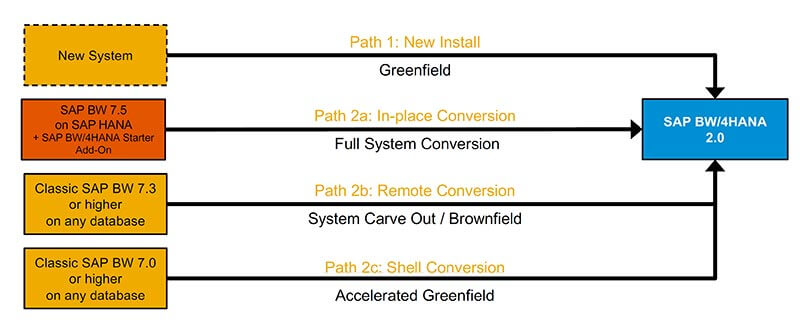
Shell approach gives flexibility in changeover and helps fulfil the customer needs in a significant way with the salient features as mentioned below.
- Supports the carve out scenarios more efficiently since there is no Requests association. This is unlikely with Remote or IN-place conversions
- High flexibility for the customers in making decisions on the data retention policy of the legacy Data.
- Advantage for the customer to build a clean BW/4HANA system with the option to cherry pick and carry forward their existing data flows with relevant data sets or even start fresh with the option to leave the legacy data behind. (Accelerated green field )
- Flexibility to optimize the existing flows and incorporate the BW contents at the same time
Know more about shell conversion through BW/4HANA Webinar Series
In this blog we will be focusing on how to handle historical data loads during a BW/4 HANA migration using Shell Conversion. The 2 options available for loading legacy data are:
- Load data from Source systems
- Load data from legacy BW system
Loading from original source system has the following disadvantages:
- Not all the data will be available in the sources (retired legacy systems, data archived etc.)
- Loading from original source does not allow loading data directly to the final targets in BW/4 and will have to go through the data flows requiring further troubleshooting.


Comments
Post a Comment