Integration of Google BigQuery with SAP Data Warehouse Cloud

Data federation between Google BigQuery and DWC has been explored in the following blogs:
- Google BigQuery to SAP Data Warehouse Cloud DWC
- Data Federation Between SAP Data Warehouse Cloud (DWC) and Google BigQuery
Here, delving deeper into this usecase, we create a Google BigQuery connection based on a specific GCP Service account in DWC and access data from a different third-party account in BigQuery. Read on to find out how this is done.
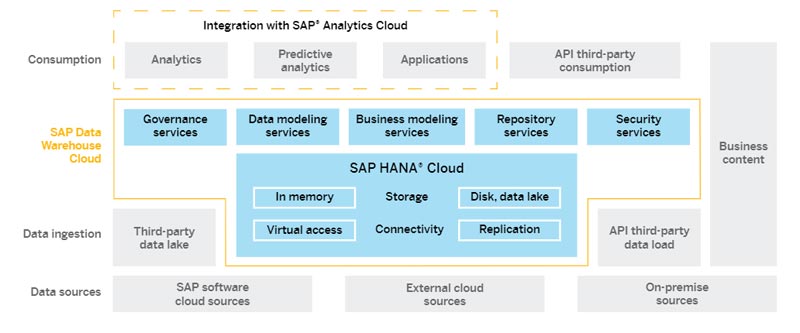
SAP Data Warehouse Cloud (DWC) is a cloud-based data warehousing solution that combines both efficient data management and advanced analytics. Built on the SAP HANA Cloud database, DWC combines data from several sources (SAP and third-party data, across clouds and on-premise repositories), enabling highly efficient real-time analysis.
Google BigQuery is part of the Google Cloud Platform (GCP) – It is a serverless, scalable, multicloud data warehousing solution that enables data analysis at a petabyte scale.
Once integrated with DWC, data from Google BigQuery can be queried directly by means of virtual tables in DWC. Live connectivity ensures that queries are federated through virtual tables with fresh data and there is never any need for caching or to replicate the data from the source.
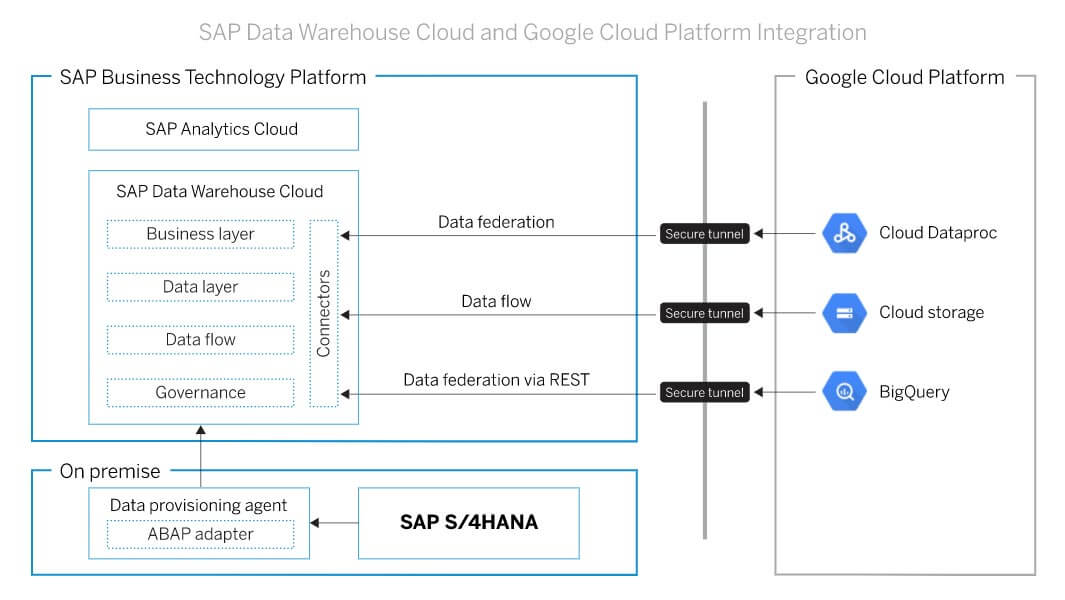
DWC can connect to GBQ using two mechanisms:
- Through SDI with the use of the Google BigQuery adapter
- Directly from DWC through the connection type 'Google BigQuery'
As of May 2021, the first connection type (through SDI) is not available. It requires a 3rd party driver, but this has been blocked by SAP for security reasons.
This blog will focus on the second method, i.e., establishing a connection directly from DWC using the ‘Google BigQuery’ connection type.
Following are the prerequisites to integrating Google BigQuery data with SAP DWC
- Google Cloud Platform Account
- User with relevant authorization to use Google BigQuery
- Google BigQuery Service Instance with data
- SAP DWC instance


Comments
Post a Comment